과제1. Github Action 실습
Github Actions를 통한 배포 Flow (클라이언트)
GitHub -> GitHub Actions -> Amazon S3
Build: github acitons의 YAML 파일에 적힌 명령어를 토대로 Webpack을 이용해 빌드
Deploy: github acitons의 YAML 파일에 적힌 명령어를 토대로 s3로 빌드 결과를 업로드
Source: Github reference 브랜치에 코드가 커밋
먼저 ,Setting > secret > action 탭을 클릭한후 ,
AWS_ACCESS_KEY_ID와 AWS_SECRET_ACCESS_KEY를 설정한다.
AWS 액세스 키와 비밀 액세스 키를 환경 변수에 직접 저장하는 것은 보안적으로 좋지 않다. 따라서, 가능하다면 AWS Secrets Manager 또는 AWS Parameter Store와 같은 안전한 방법으로 AWS 자격 증명을 저장하는 것이 좋다.
그다음 client.yam 파일을 작성
name: client
on:
  push:
    branches:
      - reference
jobs:
  build:
    runs-on: ubuntu-20.04
    steps:
      - name: Checkout source code.
        uses: actions/checkout@v2
      - name: Install dependencies
        run: npm install
        working-directory: ./my-agora-states-client
      - name: Build
        run: npm run build
        working-directory: ./my-agora-states-client
      - name: SHOW AWS CLI VERSION
        run: |
          aws --version
      - name: Sync Bucket
        env:
          AWS_ACCESS_KEY_ID: ${{ secrets.AWS_ACCESS_KEY_ID }}
          AWS_SECRET_ACCESS_KEY: ${{ secrets.AWS_SECRET_ACCESS_KEY }}
          AWS_EC2_METADATA_DISABLED: true
        run: |
          aws s3 sync \
            --region ap-northeast-2 \
            build s3://fe-56-ysycoding-s3 \
            --delete
        working-directory: ./my-agora-states-client
작성후 커밋한다.

Webpack을 이용해 Repository에 있는 파일들을 빌드하고 Amazon S3로 빌드 결과를 업로드 한다.
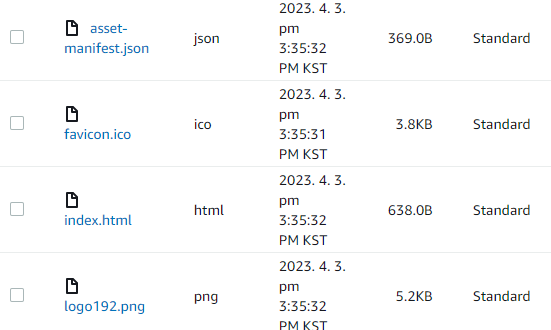
배포결과

S3 자동화하기전
npm install
npm teset
npm build
S3 버킷 직접 열어서 직접 업로드
자동화 후(github action)
npm install
npm test
npm build
S3 버킷 열어가지고
거기다가 대신 업로드
-> push 만 해주면
-> github action 워크 플로가 알아서 돌아서 잘 S3 버킷 올려준다.
Q my-agora-states-practices/.github/workflows/ 에서 client.yml , pullRequest.yml 이 있는데 pullRequest.yml 를 지워야될까?
my-agora-states-practices/.github/workflows/ 디렉토리 안에 있는 pullRequest.yml 파일은
pull request가 생성될 때마다 실행되도록 설정한 GitHub Actions workflow이다.
client.yml 파일과 pullRequest.yml 파일은 서로 독립적인 GitHub Actions workflows이다.
즉, 하나의 workflow가 실행 중일 때, 다른 workflow는 그 영향을 받지 않는다.
따라서 pullRequest.yml 파일을 삭제한다고 해서 client.yml 파일이 영향을 받거나 실행이 중단되지는 않는다.